-
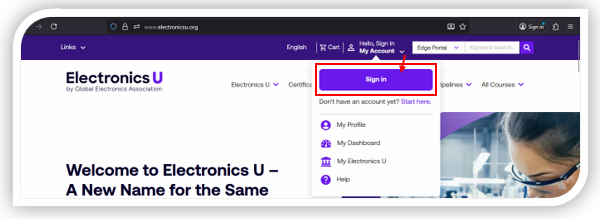
Navigate to https://www.electronicsu.org and click Sign In.
-
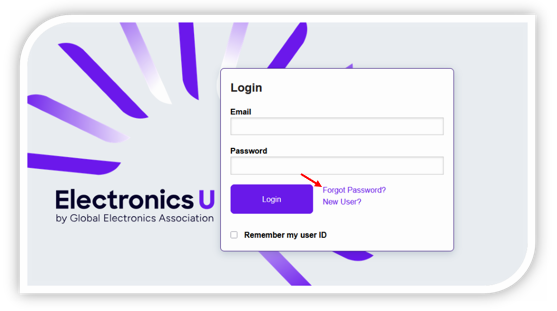
This will bring you to the Login Screen, but do not enter your credentials here; instead, click Forgot Password.
-
On the Password Assistance page, enter your email address in the required field provided, then click Send Email.
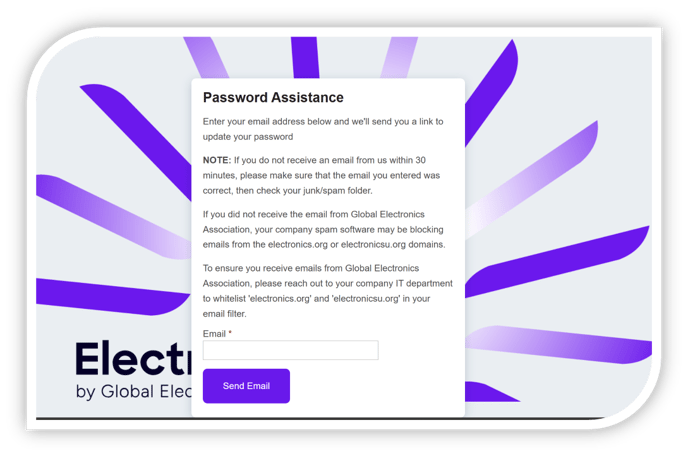
- You should receive an email from no-reply@electronicsu.org to set your new password, then go to https://www.electronicsu.org to log in.
- Upon your first log-on, a policy agreement will greet you. Accept the policy agreement, then finalize and verify your profile information.
English