- As an existing admin, you can follow these instructions to add another admin to your site.
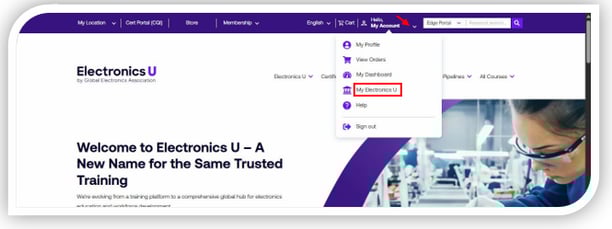
- Log in at https://www.electronicsu.org/ and click My Electronics U.
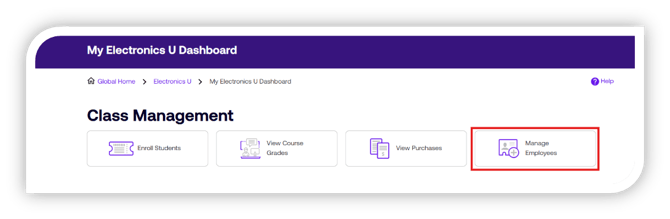
- This will bring you to the dashboard for the Education Portal. Under Class Management, click Manage Employees.
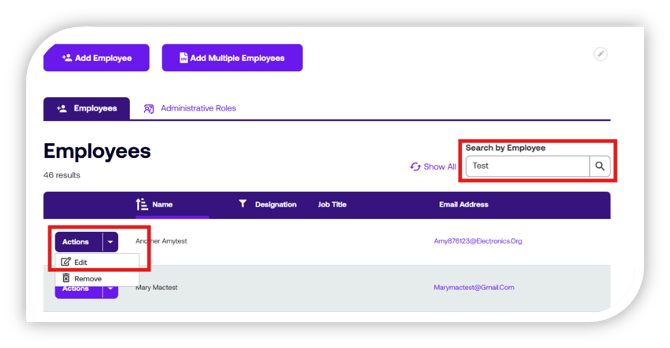
- You can search for any name in the Employee Directory. Once a user has been found, click Actions before their name. A drop-down menu will appear; choose Edit.
Please note: The user must already be in the Employee Directory; if they are not, please add them now. - You can edit only the user’s job title, function, and administrative roles in their profile. If an individual needs a name or email change, they must contact us directly. To add them as a Location Administrator, check the box labeled “Location Administrator.” Then, click Save.
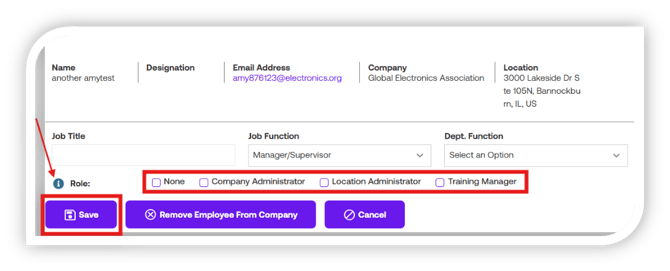
a. If you need more information on each of the roles, hover over the 'i' to receive a tooltip with the definitions and explanations. - The user will now have admin privileges; the next time they log in, they will be presented with a new Admin agreement to accept before proceeding.
Please note: A Global Electronics Association staff member must add the first Location Administrator. Before proceeding, please contact support@electronicsu.org to have the first Location Administrator added if needed.
English