
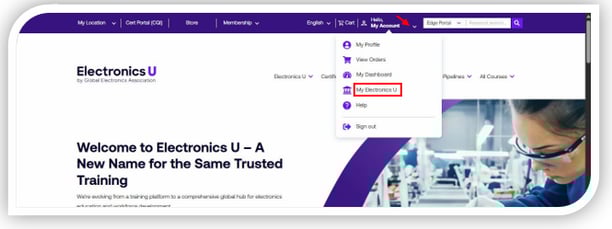
- Log in at https://www.electronicsu.org and click My Electronics U to access the dashboard.
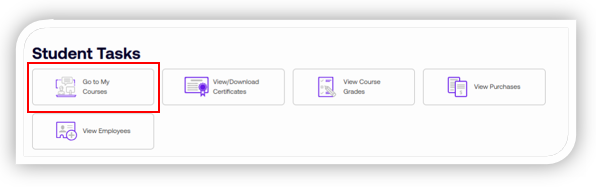
- Under Student Tasks, click Go to My Courses.
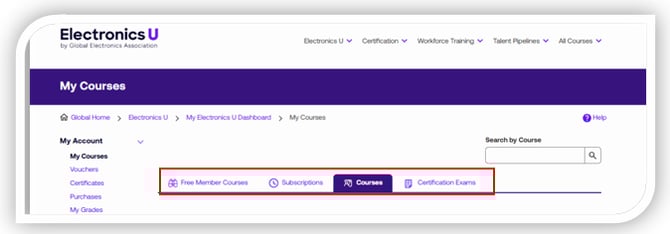
- You will be presented with a page with three tabs for options.
-
- Free Member Courses: If your company is a Member, you will have all the free courses included with the company's Membership. Note: This will remain empty unless you are part of a company with a Global Electronics Association Membership.
- Subscriptions: If your company is a Subscriber, your subscription courses will be listed here. Note: This will remain empty if your company is not a Subscriber.
- Courses: Any current purchased courses will populate within the Courses tab.
- For Member or Subscription courses, click Enroll next to the course you are interested in taking. Once enrolled, the button will change to Start; click the button to begin.
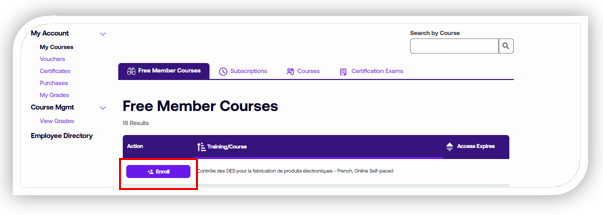
- For Paid courses, click Start or Resume next to the course you seek.
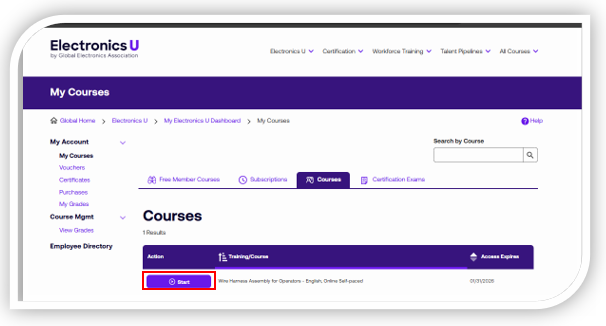
- Once you click your Start or Resume button, you will be taken directly to your course in the Learning Management System.
If you need additional help, please contact us at support@electronicsu.org.