
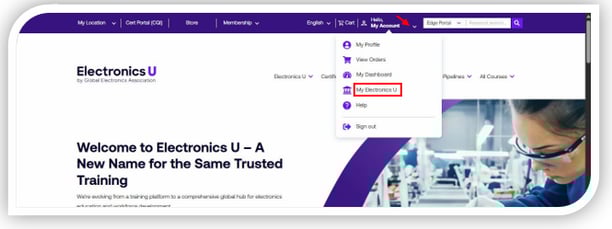
- Log in at https://www.electronicsu.org and click My Electronics U to access the dashboard.
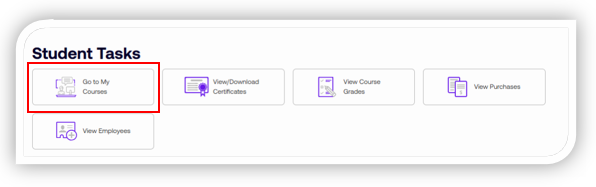
- Under Student Tasks, click Go to My Courses to be brought to your list of courses.
- You will see three tabs: Free Member Courses, Subscriptions, and Courses. Upon opening, the page will default to the Free Member Course tab. You can choose the appropriate tab for the Free Member or Subscription course you may be looking for.
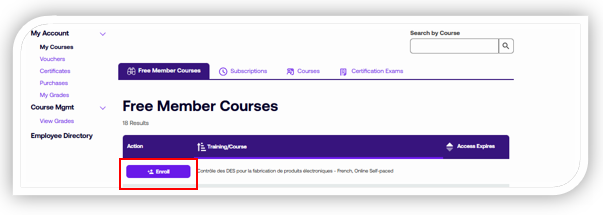
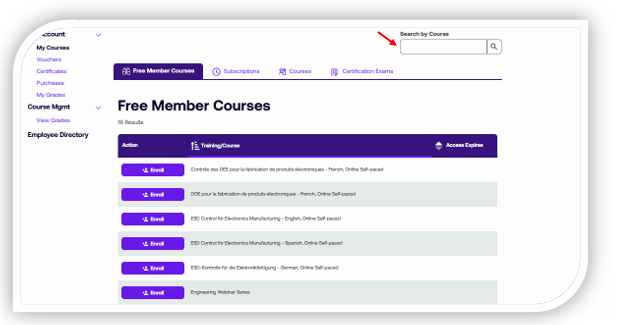
Note: The Courses tab is for paid courses you are currently enrolled in. - Find the course you need in the language of your choice and click the Enroll button in front of it. You may also use the Search bar at the top of the screen.
- The Enroll button will become a Start button for you to access your course. Click the Start button to be taken to the Learning Management System, where the course training is held.
Note: Return to this page anytime to resume a course that has not been finished or enroll in a new one.
If you need additional help, please contact us at support@electronicsu.org.