
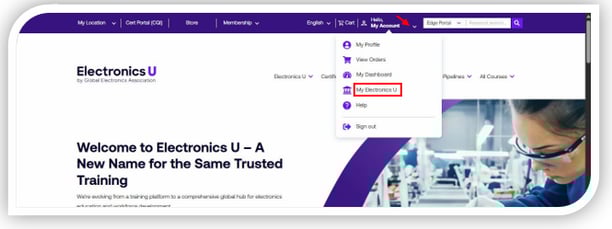
- Log in at https://www.electronicsu.org and click My Electronics U to access the dashboard.
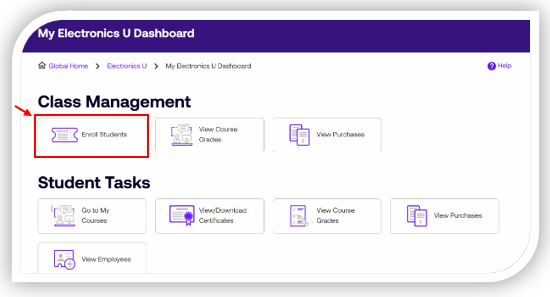
- Click Enroll Students
3. You will see three tabs: Free Member Courses, Subscriptions, and Courses. Choose the tab that will house the course you are looking for:
a. Free Member Courses = Courses included with your company's membership
b. Subscriptions = Courses included with your company's subscription
c. Courses = Any paid vouchers beyond those included with a membership or subscription
4. Click View Vouchers to the right of the voucher you are looking to enroll yourself or another person into. 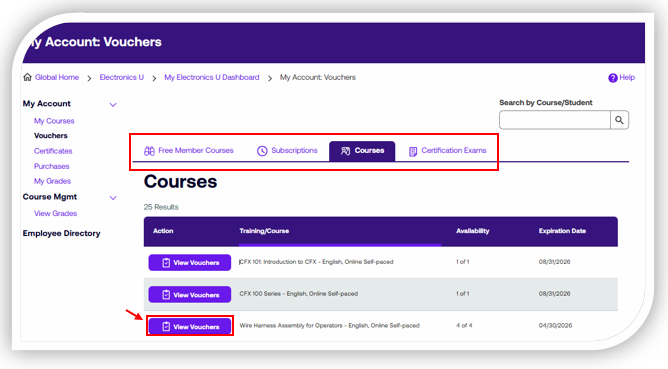
5. Click Enroll Students 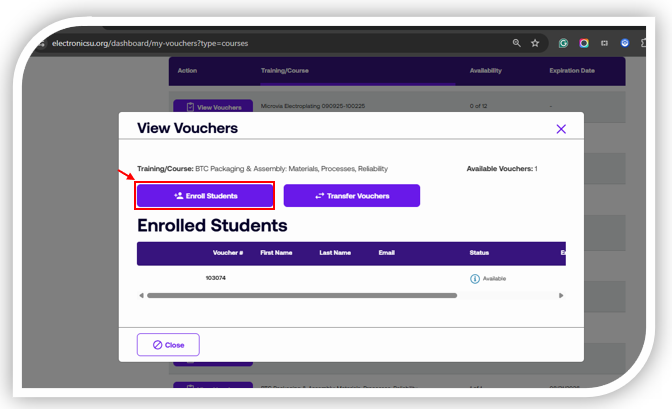
6. Enter the student’s first name, last name, and email address, then click Enroll Now.
Note: For Online Instructor-led Courses with future dates, you may select the preferred dates under the "Scheduled Date" drop-down. 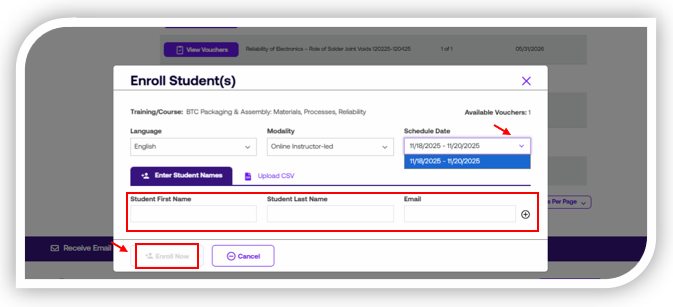
7. Once the user is enrolled, they can access the course from My Courses.
If you need additional help, please contact us at support@electronicsu.org.